
Overview :🧧
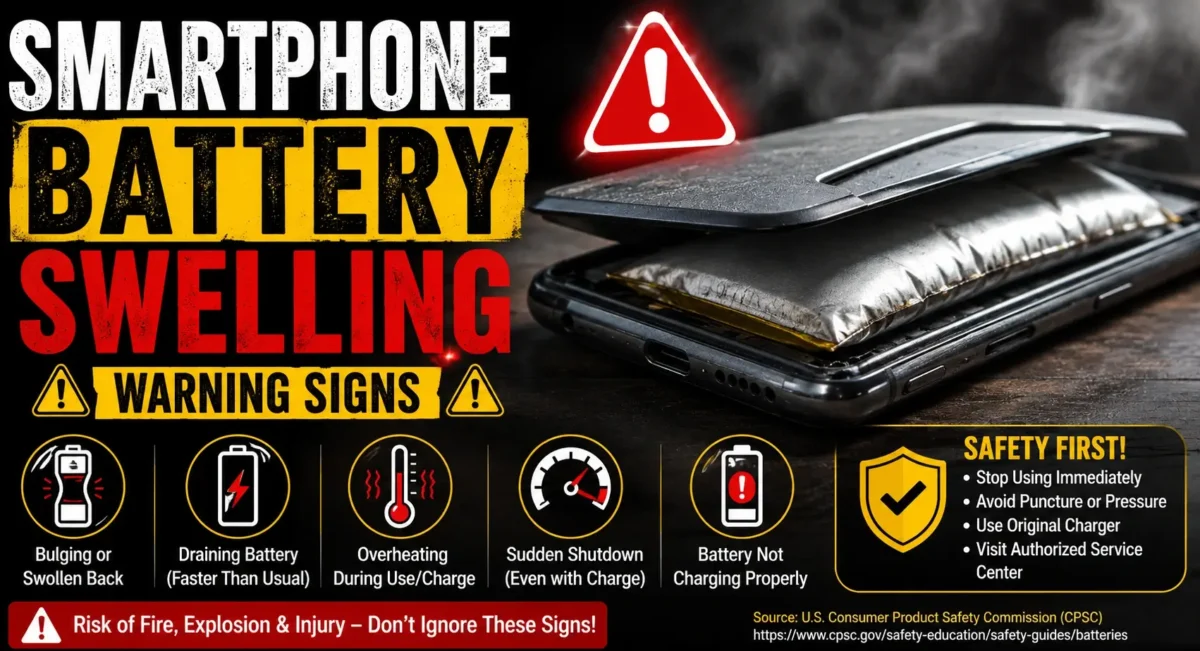
Swollen Battery Warning Signs : Smartphones are more capable than ever, but to achieve this they rely on sophisticated lithium-ion batteries that need to be packed with energy and be able to charge quickly. Although the batteries in smartphones are safe for the most part when rightfully used, they can go haywire and one of the worst situation to handle is battery swelling.
Battery bulging is not just a performance issue. It turns into a hazard if left unattended. Some users appear to have opted to keep using their phones even after their device showed signs of a bulged back plate, lifted screen, or abnormal heating.
In this post, we will tell you what are the signs of Smartphone Battery Swelling and why it happens, what you should do right away, and when the best solution is to go to an authorized service center.

What Is Smartphone Battery Swelling?
A smartphone battery is based on lithium-ion technology. Over the course of the internal chemistry, gas may develop inside the battery cells.
When this gas builds up, the battery starts expanding.
This expansion is called:
- Battery swelling
A swollen battery takes up extra internal space, which can push against other phone components like:
- Display panel
- Back cover
- Motherboard
- Internal cables
Ignoring it can damage the phone permanently.
Why Does a Smartphone Battery Swell?
Several factors can cause battery swelling.
1. Battery Aging
Every rechargeable battery loses capacity over time.
After hundreds of charging cycles:
- Battery chemistry changes
- Internal resistance increases
- Heat generation rises
Older batteries have a higher chance of swelling.
2. Excessive Heat
Heat is one of the biggest enemies of lithium batteries.
Common causes:
- Gaming while charging
- Using phone in direct sunlight
- High-temperature environments
- Poor-quality chargers
Continuous heat stress can damage battery cells.
3. Using Fake or Poor-Quality Chargers
Many users buy cheap chargers to save money.
These chargers may deliver:
- Incorrect voltage
- Unstable current
- Poor temperature control
This can affect battery health over time.
Always prefer:
- Original charger
- Certified charging accessories
4. Physical Damage
- A phone drop can damage internal battery layers.
Even if the phone looks normal outside, internal damage may start a swelling process later.
Smartphone Battery Swelling Warning Signs You Should Never Ignore :😲
Recognizing early signs can prevent bigger damage.
1. Back Panel Starting to Lift
One of the clearest signs.
You may notice:
- Back cover separating slightly
- A gap appearing near the edges
- Phone no longer sitting flat on a table
This usually happens because the expanding battery is pushing outward.
2. Screen Lifting From the Frame
If your display appears slightly raised:
- Touch panel separates
- Screen edges lift
- Display does not fit properly
- The battery underneath may be expanding.
Do not press the screen back down.
3. Phone Looks Thicker Than Before
A swollen battery increases the phone’s thickness.
You may notice:
- Case becoming tight
- Buttons feeling unusual
- Phone not fitting properly in its cover
4. Battery Percentage Behaves Abnormally
Battery swelling can sometimes come with battery issues like:
- Sudden percentage drops
- Unexpected shutdowns
- Battery jumping from 30% to 5%
This indicates possible battery degradation.

5. Unusual Heating
Some warmth during charging is normal.
But be careful if your phone:
- Gets hot during idle use
- Heats near the battery area
- Becomes uncomfortable to hold
Excessive heat may indicate internal battery problems.
6. Strange Smell From Phone
A chemical or unusual smell is a serious warning sign.
If you notice:
- Sweet chemical smell
- Burning smell
Stop using the device immediately.
7. Charging Problems
A damaged battery may cause:
- Slow charging
- Charging stops suddenly
- Phone restarts while charging
If charging behavior changes suddenly, inspect the phone.
What To Do Immediately If You Suspect Battery Swelling :💪
If you notice any Smartphone Battery Swelling Warning Signs, follow these steps.
1. Stop Charging Immediately
Do not continue charging a swollen phone.
Charging can increase:
- Heat
- Internal pressure
- Risk of failure
2. Turn Off the Phone
If possible:
- Shut down the device
- Disconnect charger
- Avoid heavy usage.
3. Remove the Phone Case
- Cases can trap heat.
Removing the case helps the phone cool naturally.
4. Do Not Press the Swollen Area
Never try to:
- Push the back panel down
- Squeeze the phone
- Flatten the battery
A lithium battery can be damaged further by pressure.
5. Keep It Away From Heat
Avoid placing the phone near:
- Sunlight
- Hot surfaces
- Fire
- Heating devices
Keep it in a cool, dry area.

When Should You Visit a Service Center?
You should contact an authorized service center if:
- Back cover is lifting
- Screen is separating
- Phone is unusually hot
- Battery drains suddenly
- Charging becomes abnormal
- Phone has physical swelling
A swollen battery usually needs replacement. Software updates or resets cannot fix it.
Can a Swollen Battery Explode?
A swollen battery does not automatically mean it will explode.
However, ignoring it increases risk.
A damaged lithium battery can potentially lead to:
- Smoke
- Fire
- Leakage
- Thermal runaway
This is why early action is important.
Can You Replace a Swollen Battery Yourself?
For modern smartphones, DIY replacement is risky.
Reasons:
- Batteries are glued
- Internal cables are delicate
- Incorrect handling can damage the device
Professional replacement is safer.
How To Prevent Smartphone Battery Swelling :😀
Prevention is better than repair.
Avoid Extreme Heat
Do not:
- Leave phone inside a hot car
- Use heavy apps while charging
- Cover phone while charging
Use Original Chargers
- Use chargers designed for your device.
Avoid unknown brands with unrealistic fast-charging claims.
Maintain Battery Health
Good habits:
- Avoid constant 0% discharge
- Avoid unnecessary overheating
- Keep software updated
Replace Old Batteries
If your phone battery health has significantly declined, replacement may be better than continuing with an aging battery.
Battery Swelling vs Normal Battery Aging :🕵️♂️
Many users confuse these.
Normal Aging: 👇
- Lower backup
- Slower charging
- Reduced capacity
Vs
Battery Swelling: 👇
- Physical expansion
- Screen/back lifting
- Heating issues
- Shape changes
Swelling requires immediate attention.

Final Verdict :🙌
The biggest mistake users make with an inflated smartphone battery is that they wait. Minor symptoms like a bulging back panel, strange heating or charging behavior could lead to catastrophe if neglected.
Stop charging the Smartphone Battery Swelling Warning Signs appear, don’t press the phone and take the device to an authorized service center as soon as possible.
Replacing the battery is generally a straightforward fix, but ignoring signs of trouble is a risk to the phone and your safety.
🔗
📌”Oppo India Official Website Page”👈
Frequently Asked Questions — FAQ/s
Can I keep using a phone with a swollen battery?
No. Continuing to use it can increase the risk of damage.
Is battery swelling covered under warranty?
It depends on the brand, device age, and warranty terms. Service centers inspect the device before deciding.
Why is my phone back cover opening?
A common reason is battery expansion pushing the cover outward.
Can software fix battery swelling?
No. Battery swelling is a physical battery problem and requires replacement.
Should I put the swollen phone in the fridge?
No. Extreme temperature changes can damage the battery further.
