

Introduction :🧧
Oppo A5 Pro Display Problem : Display smartphone ka sabse important part hota hai, kyunki har interaction screen ke through hi hota hai. Oppo A5 Pro ek budget friendly device hai, jisme features balanced milte hain😀, lekin display ke case me users ko kai reallife problems face karni padti hain.😲
Ye blog post unhi issues ko deeply explain karta hai — kaise Oppo A5 Pro Display Issue start hota hai, daily life me users ko kaisa experience milta hai, aur kaun se practical solutions kaam karte hain.😄
📌[Also Read] — “Oppo A5 Pro 5G Honest Review“💪 ⇒ “Oppo K13 5G Display Problem Fix“📱

1. Display Brightness Issue – Outdoor Visibility Real Life Me Weak :
Oppo A5 Pro ka sabse common display problem brightness ka weak output hai. Paper specifications me brightness theek lagti hai, lekin realworld use me jab aap garmi ke din outdoor chal rahe ho, direct sunlight me phone use karna kaafi difficult ho jata hai.
Even full brightness karne ke baad bhi notifications, chat bubbles, aur social media feeds clearly visible nahi hote.
Daily routine me jaise walking, cab ride, ya bike stop light par phone check karna ho, display washedout sa feel hota hai. Indoor use me screen sahi lagti hai, lekin outdoor readability definitely ek noticeable drawback ban jati hai.
2. Color Accuracy & Tint Problem – Screen Ka Tone Yellowish Lagna :
Kai users report karte hain ki display me ek slight yellowish warm tint noticeable hota hai, especially jab white background wala content dekho. Instagram feed, YouTube thumbnails aur photos me colors thoda dull aur washedout appear hote hain.
Reallife me ye problem tab zyada irritate karti hai jab aap sidebyside kisi dusre phone ka display compare karo — tab Oppo A5 Pro ka screen instantly less vibrant dikhta hai.
Editing apps, colorsensitive work, aur even normal browsing me bhi colors natural aur punchy feel nahi hote. Yeh problem mostly LCD panel tuning ke wajah se aati hai.
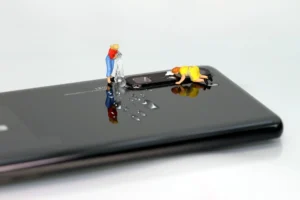
3. Touch Response Delay – Fast Typing Me Lag Noticeable :
Oppo A5 Pro ka touch response casual use me theek hota hai, lekin fast typing, gaming, ya quick scrolling me halki si delay feel hoti hai.
Kabhikabhi swipe gesture register hone me fractionofsecond ka gap hota hai, jisse smoothness thodi compromise lagti hai.
Reallife examples :
- WhatsApp par fast reply type karte waqt letters late appear hote hain.
- BGMI ya Free Fire jaise games me quick aim aur movement perfect register nahi hota.
- Instagram Reels swipe kabhikabhi skip ya double scroll kar deta hai.
Ye issues time ke sath noticeable ho jate hain jab aap heavy daily user ho.
4. Low Brightness Flickering – Dark Room Me Aankhon Par Stress :
Low brightness par screen flickering Oppo A5 Pro me ek common reallife problem hai. Jab aap night me dark room me Reels, YouTube ya long chats karte ho, screen halki blinking jaisa effect deti hai.
Iske wajah se :
- eyes pain.
- headaches.
- aur long use me discomfort ho sakta hai.
LCD panels me PWM control kam refined hota hai, isi wajah se low brightness flickering zyada prominent ho jata hai. Yeh issue kabhi kabhi camera se record karne par zyada visible hota hai.

5. Poor Viewing Angles – Tilt Karte Hi Colors Fade Ho Jate Hain :
Oppo A5 Pro ki display me viewing angles bhi strong nahi milte. Side se thoda tilt karne par colors fade hone lagte hain aur contrast drop kar jata hai.
Daily life situations jahan yeh problem noticeable hota hai :
- kisi friend ko video dekhate waqt.
- phone table par flat use karte waqt.
- Gaming me device rotate karne par.
White background greyish ho jata hai aur blacks milky sa appearance dikhane lagte hain. Isse phone ka display premium feel nahi deta.
📌[Don’t Miss] — “Oppo F31 Pro+ Display issue Fix“📱 ⇒ “Oppo Reno 14 Display issue Fix“🚧
6. Screen Durability & Scratch Issue – 2–3 Months Me Marks Dikhne Lagte Hain :
Display glass durability average quality ka lagta hai. Normal use me — jeans pocket, purse, ya table par slide karne se micro scratches bohot jaldi dikhai dene lagte hain.
Kayi users batate hain ki bina screen guard ke ekdo months me screen dull lagne lagti hai because of these tiny scuffs.Even tempered glass lagane ke baad bhi smudges aur light scratches visible rehte hain. Budget devices me scratch resistance weak hoti hai, lekin is phone me ye noticeable zyada hai.
7. Random Ghost Touches – Kabhi-Kabhi Screen Apne Aap Touch Register Karti :
Few units me users ghost touch issue bhi report karte hain, jisme screen apne aap click ya swipe register kar leti hai.
Yeh normally 3 situations me hota hai :
- Charging ke time.
- Sweaty hands se use karne par.
- Long sessions ke baad heat buildup me.
Ghost touches apps open/close kar dete hain, typing words mix kar dete hain, aur gaming experience disturb karte hain.
8. Display Yellow Patch or Bright Spot – Pressure Points Ki Wajah Se :
Oppo A5 Pro me kai logon ko display me bright spot (white/pale circular area) develop hota dikha hai.
Yeh mostly tab hota hai jab :
- Phone pocket me pressure me raha ho.
- Accidentally halka bend ya press laga ho.
- ya LCD layer me bubble formation ho gaya ho.
Yeh patch time ke sath grow karta hai aur display uneven lagne lagti hai. Yeh 100% hardware fault hota hai.
Why These Display Problems Happen? (Technical + Reallife Reasons) :🤔
Oppo A5 Pro ek budget category ka phone hai, jisme LCD panel use hota hai instead of AMOLED. LCD panels me :
- low brightness.
- poor color calibration.
- weak viewing angles.
- backlight bleeding.
- tint issues.
common hote hain.
Sath hi manufacturing batch difference aur longterm pressure/heat exposure se display behavior vary kar sakta hai.
🔥Practical Solutions (Service Center Jaane Se Pehle Try Karne Layak) :🔥
1. Color Tint Improve Karne Ke Liye
- Settings → Display → Screen Color Mode → “Cool” select karo
- Blue light filter off rakho
Autobrightness disable kar ke manual adjust karo
2. Touch Lag Reduce Karne Ke Liye
- Background apps clear
- Device restart week me 1–2 baar
- Latest software update install
3. Flickering Reduce Karne Ke Liye
- Low brightness avoid karo
- Dark mode turn off
Antiflicker mode (Agar available ho) activate karo
4. Scratches Rokne Ke Liye
- Highgrade tempered glass
- Soft pouch cover
- Pocket me keys/coins ke sath phone mat rakho
📌[Must Read] — “Oppo K13 5G vs Oppo A5 Pro 5G Shocking Comparison“⚠
When You MUST Visit Service Center :🕵️♂️
Agar display me ye problems aa rahe ho to direct service center solution hi sahi hai :
- Heavy flickering
- Green/pink/white lines
- Ghost touches
- Yellow patch
- Bright spots
- Complete color washout
- Display touch dead zones
Warranty period me mostly display replacement mil jata hai.
Final Verdict :🙌
Oppo A5 Pro ka display normal social apps, calling, browsing ke liye kaam chalau aur acceptable hai, lekin agar aap multimedia lover, gamer, ya outdoor traveler ho to display quality underwhelming lagti hai. Brightness low, colors dull, touch response inconsistent aur viewing angles weak experience dete hain.
Daily routine me phone theek perform karta hai, lekin jab premium feel ya highquality panel ki expectation rakho to display disappoint karta hai.
🔗
📌”Oppo ke is model ki aur jaankari ke liye Oppo A5 Pro 5G pe Click Krein”👈
“FAQ/s — Saawal Apke – Jaawab Hamare”😄
1 Q. Oppo A5 Pro Display Problem ka main reason kya hai?
Ans. Oppo A5 Pro me display problem usually software glitches, loose connection ya accidental damage ki wajah se hota hai.
2 Q. Oppo A5 Pro Display ko kaise fix karein?
Ans. Oppo A5 Pro me display issue ke liye restart, software update try karein. Agar problem continue kare, to authorized service center visit karein.
3 Q. Oppo A5 Pro me display lag issue kaisa hai?
Ans. Oppo A5 Pro me light apps smooth chalti hain, lekin heavy apps ya long use me lag occasional hota hai.
4 Q. Oppo A5 Pro Display warranty kya cover karti hai?
Ans. Oppo A5 Pro warranty manufacturing defects cover karti hai, accidental damage cover nahi hota.
